
The log in screen for
OPSLOGS is shown below. There
are three boxes for information.
Each of these boxes represent different information all of which are important.
User Name and Password The Operator identification is defaulted to their windows username, following the standard NRAO definition for determining employees usernames. The password is unique within the OPSLOG program and is NOT the same as the windows or unix passwords. In some future version each operator to change their OPSLOG password. The Operator identification/username can be either lower or upper case or a mixture. The Password IS case sensitive.
Formal Shift The formal shift is defined by the operator shift schedule. It is NOT the actual time the operator arrived on shift or left from shift. The default shift (date and time) upon log in is set by the time of day the log in screen was displayed. It is very important to get the shift boundaries exact (to the nearest 5 minutes). Any specific shift can be logged into more than once by the same operator who first logged into the specific shift.
Basic Observing Information at this Login Time These parameters are ALWAYS important whether first logging into the shift or logging back in. It is always important to get them correct. The fields are what was in effect at the formal time of the shift start.
The different observing information required include the following
 Obs Type This is the type
of observing that is in progress. The
different possibilities
are listed from the drop down list.
Obs Type This is the type
of observing that is in progress. The
different possibilities
are listed from the drop down list.
Proposal This is the formal
proposal code assigned to
the project when it is Astronomical observing.  Note that if proposal codes are one of the standard set the
program attempts to decipher short versions and reformats in the full
form.
Note that if proposal codes are one of the standard set the
program attempts to decipher short versions and reformats in the full
form.
Receiver This is the particular
receiver in use at the formal log in time. The
receiver can be selected from the drop down list.
Observer The observer (s) on duty in the control room.
GO Project id This is the project id assigned with the GO program and it specifically represents the sub directory in which the observing data is stored.
It is possible to log into and out of a particular shift many times (limited only by disk space). There are some restrictions.
The first operator to log into a particular shift
'owns' that shift. Any
other operator may log into this shift - if the operator logging in does
not own the shift a warning is given. The new operator will be allowed to log in or to cancel out
after a special password is specified (must be obtained from C. Bignell).
If the
operator wishes to log in the ownership of that shift is changed to the
new operator. A
note about this change is recorded in the Login
Log entry.
Only one operator is allowed to log into any specific shift at one time. If you try to log into a shift which someone else is already logged into you will be warned and not allowed to log in.
Any operator may log out of any shift (even those 'owned' by other operators).
Re logging into a particular shift is accomplished by specifying the exact formal shift start and end for that shift.
The Basic Observing Information should ALWAYS be set correctly for the time of log in. On the first log in this information must be correct for the time of the beginning of the formal shift. On successive log ins to a shift this information must be correct for the actual time of the log in, for reasons specified next.
On successive log ins OPSLOG will default
the Basic observing information to the values when last logged out. These
values can (and should if appropriate) be changed so that they are accurate
for the time of this log in. If
some of this
Basic Observing information is changed from the default, OPSLOG will automatically
generate some additional log entries depending on the details of the change.
In particular
if the Observing Type or Proposal code is changed the program will add
a Project change log entry or
if the Receiver is different from the time of the last log out a Receiver change log entry will be generated.
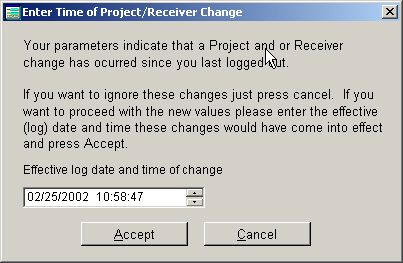
In either case you will be presented with the following screen to confirm
the change, set the appropriate time for this change and to proceed with
generating these log entries. If
the cancel option is selected no entries are made to the log and furthermore
the Basic Observing information reverts to the values at the time of the
last log out.
NOTE Important points to
remember:
1) The formal shift times MUST be specified correctly.
2) The Observing information MUST be correct at each log in.
3) A particular shift can be logged into repeatedly (see above restrictions)
by any operator but not simultaneously.